
Case study
Logistics · Web and mobile
DTDC: Booking Experience Revamp
Redesigning how DTDC’s counter staff book domestic and international shipments, on web and mobile, so the customer hears the price before the agent starts typing.
Role
Lead Product Designer, Binaryveda
Platform
Agent web app and mobile app
Scope
Domestic and international booking, with rate calculator, dashboard and design system
Worked with
Product manager, developers and DTDC stakeholders


01
The challenge
The price came last.
DTDC’s agents and retail executives book parcels at a counter, often with the customer standing in front of them. In the booking flow we mapped during research, an agent entered the sender, the consignee, the package type, its dimensions and the declared value before the tool showed a single price or delivery option.
The problem
Agents had to quote, book and bill a parcel while the customer waited, but the tool asked for everything before it gave them anything to say.
What made it hard
The quote came eighth
Service type and price appeared at step 8 of 10, after every customer and package detail.
Everything typed by hand
Agents typed twelve fields by hand for every shipment, and nothing carried over from earlier bookings.
Built for a desk
The legacy interface wasn’t responsive, so agents booking on a phone had to pinch and zoom.
What the design had to respect
Two kinds of counter
Branch (EBR) and franchise (EFR) outlets see different tools. The pending cash-settlement tile, for example, is branch-only.
Compliance rules
An E-way bill above ₹50,000 of declared value, tiered risk surcharges and GST invoices all had to fit into the booking flow.
Countries differ
International serviceability varies by country, and some destinations don’t use pincodes at all.
One flow, two devices
The same booking had to work at a desk and on a phone, for domestic and international shipments.
02
Research and discovery
Watching the counter, not the form.
We watched agents at work and interviewed them, along with other people who use the tool. We also studied booking flows from Delhivery, FedEx, UPS, Shiprocket, DHL and Porter and mapped DTDC’s own flow step by step. Requirement calls with DTDC then refined the rules for each step.
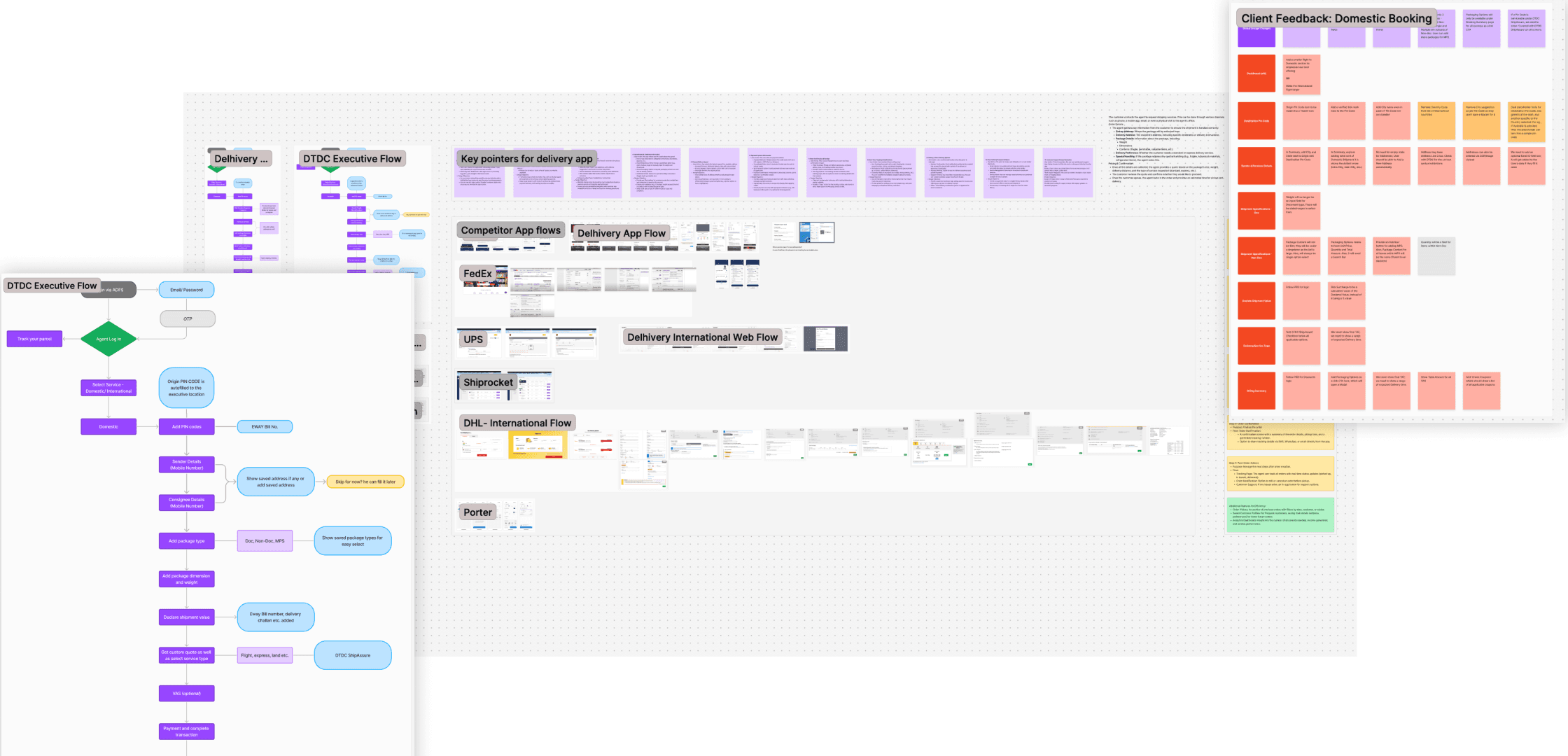
Research board: the executive booking flow, competitor flows and client feedback.
What we learned
What the design does about it
01
Speed beats completeness at the counter
Agents picked speed over detail, reusing saved addresses and frequent-destination shortcuts.
Design implication
Look customers up by mobile number, show their saved addresses and let the details be finished later.
02
The price is the conversation
Agents valued an instant quote and a clear fee breakdown because it helped them explain charges to customers.
Design implication
Ask only what’s needed to price the parcel, then show every service with its delivery time and price.
03
International needs a guide, not a longer form
Agents asked for step-by-step guidance on customs and documents that felt reassuring rather than overwhelming.
Design implication
Split international booking into short steps, and show compliance fields only when a shipment needs them.
04
The counter isn’t always a desk
Agents book from storefronts and on the move, but the legacy interface wasn’t built for phones.
Design implication
Design every booking flow for mobile too, with larger touch targets: 48 px inputs on mobile, 44 px on web.
03
Existing journey
Ten steps to book a parcel, and the quote at step eight.
This is the domestic booking flow as we mapped it during research. What the customer cares about first (which service, how fast and how much) only came near the end.
As mapped during research
01
Select service
02
Add PIN codes
03
Sender details
04
Consignee details
05
Package type
06
Dimensions and weight
07
Declared value and E-way bill
08
Quote and service type
09
Value-added services (optional)
10
Payment
Opportunity: show saved addresses, or let the agent skip and fill them in later.
Opportunity: offer saved package types instead of choosing from scratch.
The first moment the agent can tell the customer a price and delivery time.
↓
The redesign groups everything about the parcel into the first step, so the quote moves from step 8 to step 2. Customer details come after the customer has chosen a service.
Redesigned domestic flow (final designs)
01
Shipment specifications: pincode, type, contents, size
02
Service type and price
03
Sender details
04
Receiver details
05
Risk and compliance: declared value, E-way bill
06
Billing summary: services, GST, discounts
07
Payment
International adds an item-details step and, for commercial shipments, a compliance step: eight steps in all.
04
Key design decisions
Four decisions that shaped the flow.
Each one answers a research finding or a constraint from DTDC, and you can see all four in the final screens.
Decision 01
Price first, paperwork second
Problem
The quote came after every customer and package detail had been typed.
Decision
Step 1 asks only what’s needed to price the parcel: destination pincode, shipment type, contents and size. Step 2 lists every service with its delivery window and price.
Why it fits
It follows the order of the conversation at the counter (where, what and how much) and lets the agent explain the options before asking for personal details.
Price is step 2 of 7, straight after the shipment details.
Each service shows its delivery window and price side by side, with add-ons priced inline.
A running summary of what’s been entered so far, editable from here.
Decision 02
Find the customer instead of typing them in
Problem
Each booking started with blank sender and receiver forms, even for customers who had shipped before.
Decision
Enter the sender’s mobile number to load saved addresses, or upload an invoice image to read the details. If the customer is in a hurry, skip and finish later from Manage Bookings.
Why it fits
Research showed agents reaching for saved addresses and frequent destinations. The flow now offers them first.

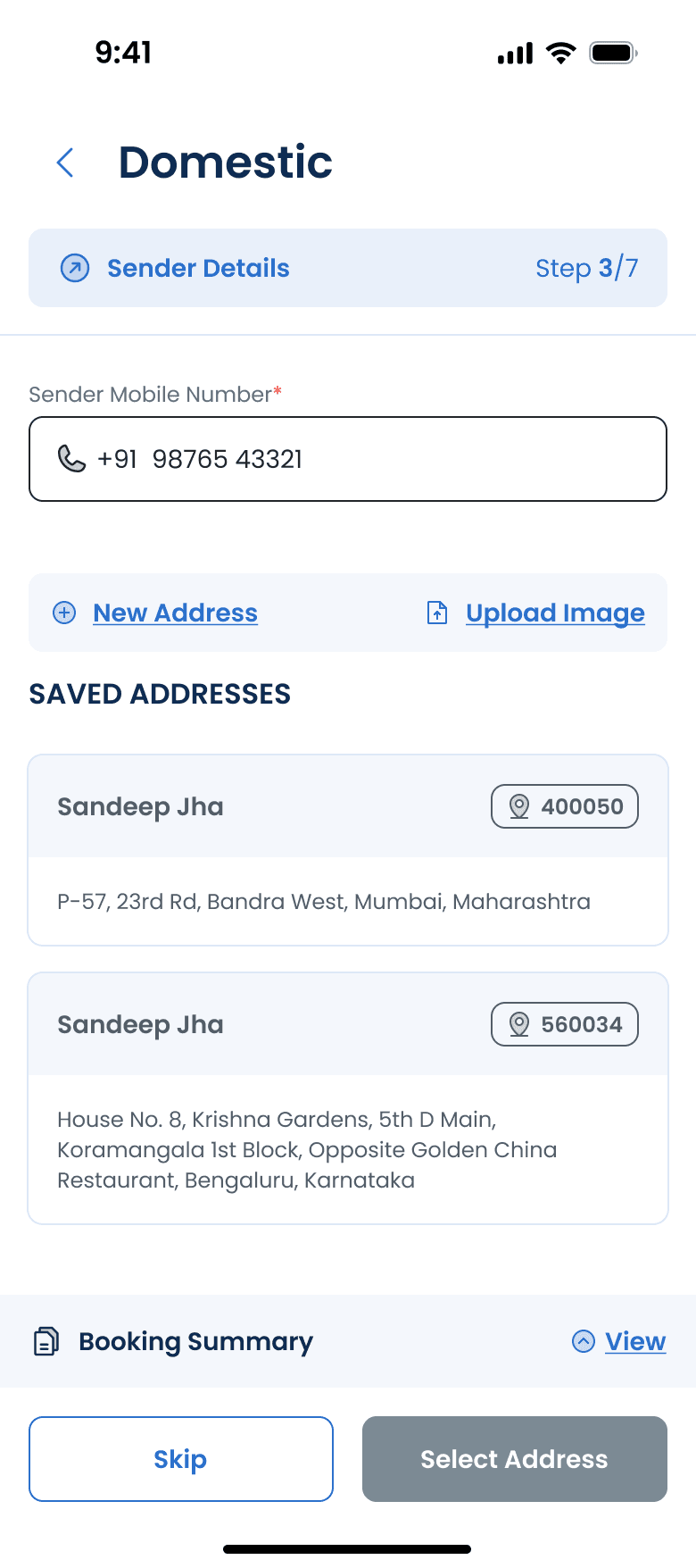
Mobile number fetches saved addresses.
Upload an invoice image instead of typing (OCR).
Saved addresses, with pincodes.
Skip now and complete later.
Decision 03
Guidance only where the risk is


Country comes first; the form adapts to it.
No pincode in this country, so state and city replace it, with a note.
International adds an item-details step; commercial shipments also get compliance.
E-way bill works as it does in domestic booking.
Export clearance: shipment terms, Incoterms, invoice and GST.
Suggested customs documents, uploaded in place.
Country comes first; the form adapts to it.
No pincode in this country, so state and city replace it, with a note.
International adds an item-details step; commercial shipments also get compliance.
E-way bill works as it does in domestic booking.
Export clearance: shipment terms, Incoterms, invoice and GST.
Suggested customs documents, uploaded in place.
Problem
International rules vary by country and shipment type. Agents were checking rates by hand, customs requirements were unclear and validation was inconsistent.
Decision
Ask for the country first, and the pincode only if that country uses one. Carry earlier details forward and lock them. Give commercial shipments a separate compliance step.
Why it fits
Agents asked for step-by-step guidance. Extra fields appear only when the shipment needs them, so simple parcels stay simple.
Decision 04
Keep the context on screen, not a full-screen wizard
Explored
Full-screen booking flow (wireframe)
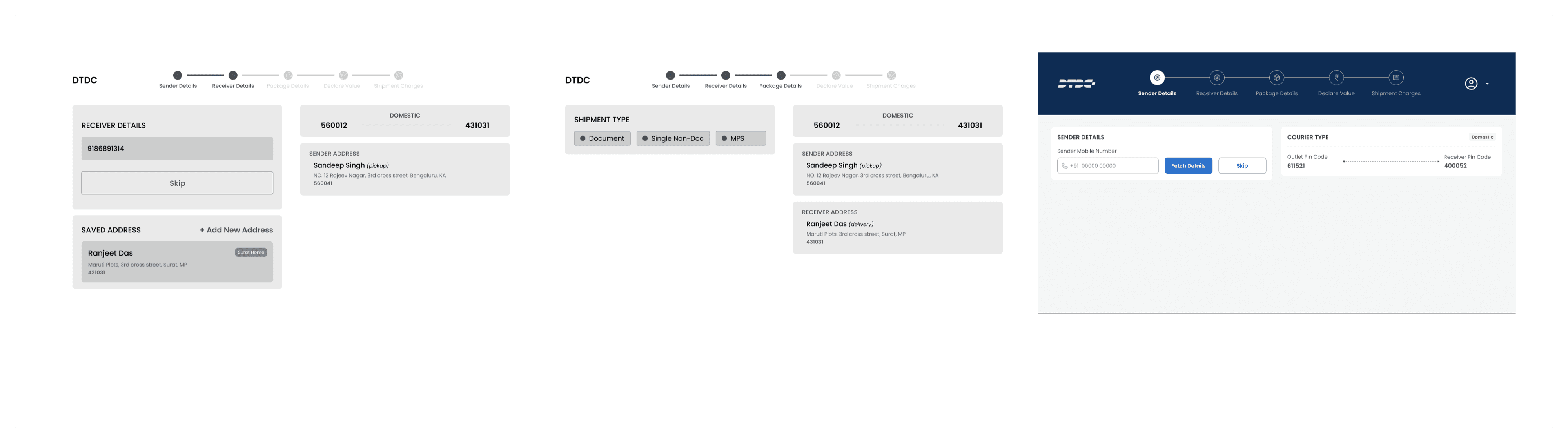
Pros noted in the wireframes: more room, focus on what matters and simpler navigation. Cons: less access to information, other features harder to reach and a bigger change for agents to get used to.
Chosen
Navigation, step tracker and summary (final)

Main navigation stays available during a booking.
A step tracker shows where the agent is.
Every summary card has an edit link.
Options considered
A full-screen flow that hides the rest of the tool, or keeping the tool’s navigation around the booking.
Decision
Keep the main navigation, add a step tracker and show everything entered so far in a summary panel with edit links. On mobile, the summary folds into a bar at the bottom.
Why it fits
The risk noted against the full-screen option was losing access to information mid-booking. The summary keeps every detail checkable without leaving the flow.
05
The final experience
Domestic and international, at the desk and on the phone.
A selection from the final designs. The full set also covers the rate calculator, manage booking, drop-off and cash settlement, plus customers and bulk booking.

Step 1 · Document weights as quick choices
Step 2 · Every service with time and price
Step 3 · Saved sender addresses

Step 6 · Billing summary with GST invoice
Mobile mirrors the web steps with a step counter and a booking summary that opens from the bottom bar.
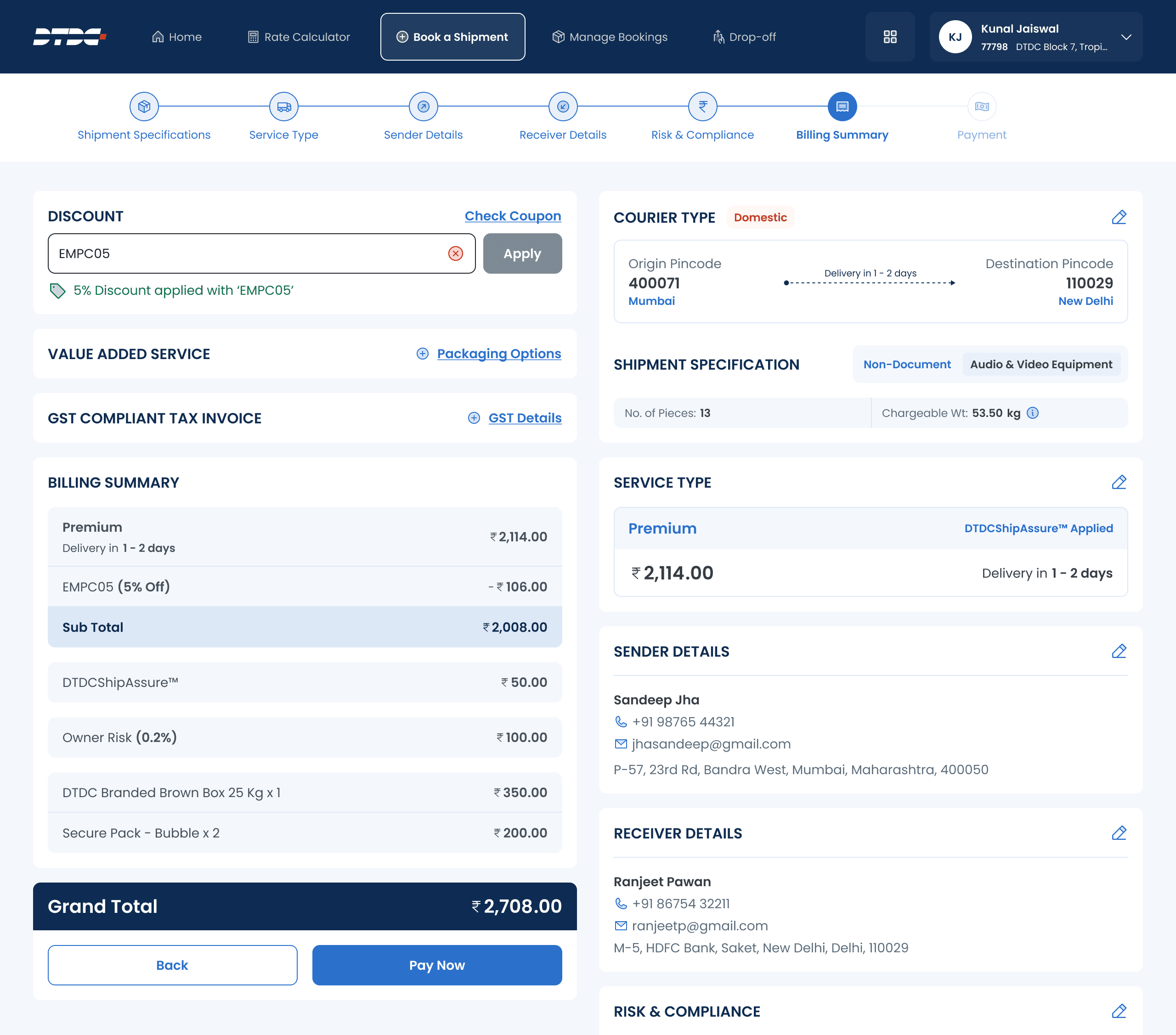
Billing summary on the web: coupon, value-added services, GST invoice and an itemised total, with every earlier step one click away in the summary.

International, step 1: country, purpose of shipment, contents and dimensions.

Every booking starts with one choice: domestic or international.

Outlet dashboard: today’s bookings, average booking time, revenue and pending work.
06
Outcomes
Booking time nearly halved.
After the redesign, agents spent less time on each shipment and customer-service issues were resolved faster. Agents also rated the tool higher.
45%
less time per booking: 8 minutes down to 4.4 per shipment
30%
faster customer-service resolution
25%
lower operational costs
3.1 → 4.5
agent satisfaction score, out of 5
Delivered
Web and mobile designs for domestic and international booking, the rate calculator, dashboard, manage booking, drop-off and cash settlement, plus customers and bulk booking. A design system for the agent platform: brand guidelines, web and mobile inputs, navigation, buttons and journey components.
What to keep measuring
Average booking time for walk-ins, which the new dashboard design includes, to see whether the gain holds. First-time booking completion, booking errors and corrections, plus support calls about bookings.
07
Reflection
The biggest simplification wasn’t removing steps. It was changing their order.
What I learned
A complex workflow gets easier when the screen follows the conversation at the counter: where, what and how much, and only then who.
A trade-off I’d make again
A full-screen flow would have looked cleaner. Keeping the navigation and a live summary was less tidy, but it kept agents in control mid-booking.
What I’d validate next
Error rates and first-time completion from the dashboard, and a usability round focused on international commercial shipments.